


Strings Series
Gayageum, Geomungo, Haegeum, and Ajaeng in one focused string collection.
Produced using officially created audio from
Korea's premier musical institution.
Capturing the breath and soul of
a millennium.
Recorded by state-recognized
master artists.


We recorded the most iconic instruments of Korea with state-of-the-art technology. Explore the unique timbre of each family.
Gayageum, Geomungo, Haegeum, Ajaeng.
Deep resonance of silk strings. From the bending notes (Nonghyeon) to the sharp
attacks.
Daegeum, Sogeum, Piri, Taepyeongso.
The breath of nature. Expressive vibrato and dynamic airflow control.
Janggu, Buk, Jing, Kkwaenggwari.
The heartbeat of tradition. Sampled with extensive velocity layers for ultimate
realism.
Choose one focused Josun Series family when you do not need the full Platinum Bundle.
Gayageum, Geomungo, Haegeum, and Ajaeng in one focused string collection.
Daegeum, Sogeum, Piri, and Taepyeongso for breath, reeds, and flutes.
Janggu, Buk, Jing, Kkwaenggwari, cinematic drums, and ritual percussion.
THE COMPLETE PLUG-IN BUNDLE
16 Creative Audio Plugins
160 Presets
One complete production system built around musical Sweet Spots. Shape tone, dynamics, space, width, and character across sixteen focused processors without breaking your flow.
16 PLUGINS$169$10.56 per plugin


Air, sheen, and high-frequency polish without brittle EQ edges.


Where Korean instruments, recording craft, and music technology meet.
Powering the sound of Korea's most iconic content.
From blockbuster games to chart-topping K-Pop hits.
From installation to license management and technical support.
QLAUDIO is here to ensure your creative flow never stops.


Full Collection (36 Inst.)
PRODUCT DETAILS
Strings, woodwinds, and percussion from the complete Josun Series, plus the Phrase Expansion Pack.
Download from My Account, install the free Decent Sampler player, then load the included .dslibrary or .dspreset files.
macOS 10.13+ on Intel and Apple Silicon, or Windows 10+ 64-bit. Use Decent Sampler in a compatible DAW.
One purchase, no subscription. Use the sounds in commercial music and media; redistribution of the source files is not permitted.
From the royal courts to the folk villages. Explore the full spectrum of Korean traditional sound with 36 meticulously sampled instruments.
Each instrument family comes with its own custom-designed interface,
optimized for authentic performance and control.
Deep resonance of silk strings. Control bending notes (Nonghyeon) and sharp attacks with precision.
The breath of nature. Manage expressive vibrato and dynamic airflow for realistic solos.
The heartbeat of tradition. Extensive velocity layers and round-robins for ultimate realism.
Deep, resonant bowed and plucked zithers.
From court majesty to folk
improvisation.


The breath of Korea.
Clear bamboo flutes, piercing reeds, and
meditative
clay vessels.


The heartbeat of tradition.
From massive temple bells to energetic
folk rhythms.


Recorded in high fidelity at the National Gugak Center. Experience the authentic textures, breath, and resonance of Korea's musical legacy.

Useful when a score needs Korean color quickly without forcing traditional tuning issues into a modern arrangement. Equal Temperament tuning helps the instruments blend with pianos, synths, and orchestral layers while preserving their source character.
Built for arrangers who need traditional color that works inside modern DAW sessions. Hand-controlled vibrato (Nonghyeon), round-robin percussion, and organized categories make it feel like a focused Joseon sound palette instead of a scattered sample folder.
The 35+ instrument range supports intimate melodic writing, ambient textures, ritual colors, and cinematic percussion. Polyphonic winds and heavy Korean percussion make it practical for cues that need something distinct from common orchestral or Taiko colors.
Designed to keep a large Korean instrument collection accessible without a heavy setup. Updates such as convolution reverb and no-round-robin options expand the workflow for film, game, and media scoring.
Average tuning and Western-session compatibility make the library easier to place in fusion Gugak, commercials, and hybrid scoring. Key-switched articulations and Poly/Mono modes give composers practical control without slowing down the arrangement.
Powered by the Decent Sampler engine, the collection is designed for Mac and Windows workflows across major DAWs such as Cubase, Logic, and Ableton. It keeps installation and session recall straightforward for media production work.
The expanded playing techniques and rare colors, including instruments such as Banghyang, give composers more ways to build Korean-led arrangements instead of using generic orchestral substitutes.
Useful for composers who want Asian or Korean textures but do not want traditional tuning and articulation details to slow the session down. Instruments such as Gayageum can add immediate identity to fantasy, game, and trailer cues.
Designed to hold presence inside dense arrangements. Cinematic percussion, ritual colors, and bright melodic instruments help add Korean identity to trailer, game, and hybrid orchestral music.
Authentic sounds meet modern workflow.
Fully compatible with the free Decent Sampler platform.
Cross-platform compatibility (Windows, Mac, Linux, iOS). Runs as VST, VST3, AU, and AAX inside supported hosts. No expensive player required.
Access vibrato, bending, glissando, and ornaments instantly using low-octave key switches.
Choose from 9 Reverb types including Cathedral, Chamber, and Plate to place instruments in any space.
Map Mod Wheel (CC#1) to dynamics for expressive performances. Adjust Tone, Density, and Bottom to sculpt your sound.
A comprehensive guide to the Josun Series Phrase Expansion library.
Navigate centuries of musical tradition with these essential notes.
36 Instruments. Infinite Inspiration. One Bundle.
Buy Now - $249.00 $499.00 (Save $250.00)Choose the individual series that fits your needs.

The sound of silk strings. Features the sorrowful Ajaeng, graceful Gayageum, percussive Geomungo, and expressive Haegeum.

The breath of Korea. Includes the resonant Daegeum, piercing Piri, bright Taepyeongso, and clear Danso.

The heartbeat of tradition. Spans from the Samulnori quartet to massive Cinematic Drums and Ritual Bells.
QLAUDIO UNI-VERSE SERIES
Air, sheen, and high-frequency polish without brittle EQ edges.
PRODUCT DETAILS
The pre-launch collection covers tone, dynamics, space, width, creative movement, and utility as one connected system.
Installers, activation, and account delivery are not available during the pre-launch period.
Supported formats, system requirements, and host compatibility will be published with the official release.
Final license, update, and pricing information will be available before purchasing opens.
THE ONE-KNOB WORKFLOW
Explore the visual system behind the UNI-VERSE pre-launch collection.

THE CORE IDEA
UNI-VERSE is built around musical macro controls. You do not need to understand every threshold, timing, filter, gain, tone, and blend setting before making a sound. The main knob moves the connected parameters together, keeping them in useful ranges while you listen.
Each UNI-VERSE plug-in connects its main knob to the settings producers usually adjust one by one. As you turn it, the processor automatically balances level, tone, timing, intensity, and mix behavior so the result stays musical instead of random.
The main control is not just one parameter. It moves a connected set of internal values together so a simple turn creates a complete sound change.
Thresholds, gain, timing, tone, and blend ranges are mapped to practical musical zones, helping you avoid harsh, weak, or over-processed settings.
You can make decisions by listening instead of studying technical controls first. The advanced settings remain available only when you want to refine.
ENGINEERED BEYOND THE KNOB
UNI-VERSE is built around a shared production DSP core. Behind the simple macro controls are oversampled nonlinear engines, reconstruction-aware peak protection, phase-aligned routing, and CPU-stable real-time processing.
Reconstruction-aware output protection designed to catch hidden inter-sample peaks before they reach your final output.
High-quality oversampling around saturation, drive, clipping, and tone stages helps keep harmonics smooth and controlled.
Selected processors reduce aliasing at the source of nonlinear distortion, instead of only filtering after artifacts are created.
Internal latency compensation keeps dry/wet blends solid and focused, avoiding unwanted hollow or smeared parallel tone.
Denormal protection and optimized math paths help prevent hidden CPU spikes during silence, fades, long tails, and automation.
Validated through true-peak reconstruction, BS.1770 loudness analysis, aliasing checks, null tests, and automation stress checks.
WHY IT FEELS FAST
UNI-VERSE is designed around the moment when you know what the sound needs, but do not want to stop the session to rebuild a full plug-in chain. Move the macro, then refine only if the track asks for it.
Drag the knob. The visible meters represent hidden parameters moving together into a musical range.
LISTENING PROOF
Short before/after clips, screen recordings, and session walkthroughs can be connected here as soon as the final demo media is ready.
A demo slot for AIR, DEESSER, COMP, and DRIVE on vocal material.
A demo slot for SHAPER, CHAIN, COMP, LIMIT, and SUB on rhythmic sources.
A demo slot for VERB, DELAY, WIDER, MOD, PITCH, PIXEL, and GAIN.
THE LINEUP
Each plug-in starts with an immediate Sweet Spot macro, then gives you secondary controls only when the sound needs extra refinement.
This video is an AI-generated visual concept created to help explain the audio processing, and is not the actual operating screen of the plug-in.
Use it when a vocal, synth, acoustic instrument, or full mix needs expensive top-end shine without becoming sharp or brittle.
This video is an AI-generated visual concept created to help explain the audio processing, and is not the actual operating screen of the plug-in.
Use it when kicks, basses, 808s, or cinematic hits need more physical weight without piling muddy EQ into the low mids.
This video is an AI-generated visual concept created to help explain the audio processing, and is not the actual operating screen of the plug-in.
Use it when a clean vocal, drum loop, bass, or synth feels too flat and needs analog-style heat, weight, or edge.
This video is an AI-generated visual concept created to help explain the audio processing, and is not the actual operating screen of the plug-in.
Use it when a vocal, bass, drum bus, or instrument needs controlled dynamics quickly without hunting through threshold, ratio, and gain staging.
This video is an AI-generated visual concept created to help explain the audio processing, and is not the actual operating screen of the plug-in.
Use it when a demo, beat, stem, or quick master needs louder playback level while keeping peaks controlled and the mix intact.
This video is an AI-generated visual concept created to help explain the audio processing, and is not the actual operating screen of the plug-in.
Use it when vocals, dialogue, or bright ad-libs have painful S sounds but still need to keep clarity and presence.
This video is an AI-generated visual concept created to help explain the audio processing, and is not the actual operating screen of the plug-in.
Use it when vocal takes, drum recordings, guitar tracks, or noisy samples need cleanup between phrases without chopping off the musical tail.
This video is an AI-generated visual concept created to help explain the audio processing, and is not the actual operating screen of the plug-in.
Use it when drums, percussion, guitars, or plucked sounds need more punch, softer attack, tighter decay, or longer sustain.
This video is an AI-generated visual concept created to help explain the audio processing, and is not the actual operating screen of the plug-in.
Use it when bass, pads, vocals, or effects need to move around the groove and create pocket without setting up sidechain routing.
This video is an AI-generated visual concept created to help explain the audio processing, and is not the actual operating screen of the plug-in.
Use it when a vocal, instrument, drum, or sound design layer needs space fast, from a tight room to a wide hall, without opening a complex reverb page.
This video is an AI-generated visual concept created to help explain the audio processing, and is not the actual operating screen of the plug-in.
Use it when vocals, guitars, synths, or transitions need rhythmic repeats, stereo depth, or tape-style movement that sits behind the source.
This video is an AI-generated visual concept created to help explain the audio processing, and is not the actual operating screen of the plug-in.
Use it when synths, backing vocals, buses, or quick masters need more width while the low end stays focused and mono compatibility remains easy to check.
This video is an AI-generated visual concept created to help explain the audio processing, and is not the actual operating screen of the plug-in.
Use it when a static sound needs motion, width, shimmer, wobble, or rhythmic movement without loading separate modulation plug-ins.
This video is an AI-generated visual concept created to help explain the audio processing, and is not the actual operating screen of the plug-in.
Use it when vocals, samples, or instruments need quick pitch movement, formant color, octave effects, or creative character shifts.
This video is an AI-generated visual concept created to help explain the audio processing, and is not the actual operating screen of the plug-in.
Use it when a sound is too clean and needs lo-fi texture, old digital color, bandwidth loss, or controlled degradation.
This video is an AI-generated visual concept created to help explain the audio processing, and is not the actual operating screen of the plug-in.
Use it at the start or end of a chain when you need fast level matching, phase checks, mono inspection, channel swap, or width control.
SESSION FEEDBACK
Workflow notes for the kinds of producers, composers, and engineers UNI-VERSE is made for: fast decisions, clean controls, and reliable results across real production sessions.
AIR, SUB, and DRIVE are positioned for the first tone-shaping pass: brighten, thicken, or add character before reaching for a complicated channel strip.
K-Pop Producer Vocal production / demo finishingUNI-COMP is useful when decisions need to happen quickly. Amount finds the Sweet Spot first, then Attack, Release, and Mix refine the movement.
Mix Engineer Pop, R&B, and broadcast mixesGATE, DEESSER, and GAIN are practical session utilities rather than flashy effects. They solve small problems cleanly and keep the arrangement moving.
Vocal Producer Editing, comping, and vocal polishWidth, L-Mono, Haas, and Side Solo make it easier to widen with confidence on synth buses, background vocals, and quick master checks.
Mastering Assistant Stereo imaging / compatibility checksUNI-PIXEL adds era-based texture and UNI-DRIVE adds weight without a long setup. It is quick sound design that still feels controlled.
Electronic Producer Synths, drums, and texture designUNI-VERB and UNI-DELAY are not overloaded with pages of options. They present the core decisions first: size, decay, timing, feedback, tone, and mix.
Film Composer Atmosphere, cues, and transitionsThe shared layout keeps the series coherent. After learning one plug-in, the others make sense during deadline-heavy sessions.
Game Audio Composer Asset polishing / fast iterationThe complete set is useful when the session needs gain, dynamics, tone, space, width, pitch, and character processing in one consistent workflow.
Composer / Sound Designer Writing, editing, and mix prepRELEASE STATUS
UNI-VERSE is currently presented as a pre-launch preview. Final release timing, formats, system requirements, license terms, and pricing will be announced before the store opens.
Explore the individual processor concepts and controls in the line-up above.
Available at launchThe full UNI-VERSE collection is being prepared for official release.
Purchase unavailable during pre-launchPRE-LAUNCH STATUS
UNI-VERSE is not available for purchase, download, or activation yet. Release details will be published here when the series is ready.
From installation to license management and technical support.
QLAUDIO is here to ensure your creative flow never stops.
Account access, licenses, and purchase policy. Product-specific setup guidance is available on each product page.
MY ACCOUNT & LICENSE
Use the email address from your purchase. We will send a secure 6-digit verification code, so no password is required. After signing in, you can view your purchases, license keys, and available downloads in My Account.
Purchases are matched to the email address used for the order. Sign in with that address. If you no longer have access to it, contact with your order details.
Confirm that you signed in with the same email address used for the purchase. Newly completed orders may take a short time to appear. If the product is still missing, contact support with your order number.
Your license key is shown in My Account and is also sent in your license delivery email. Keep it private and do not share it with others.
Sign in to My Account, enter your one-time redeem code in the Redeem Code section, and the product will be added to your library. A redeemed, expired, or blocked code cannot be used again.
PURCHASE & LICENSE POLICY
Yes, absolutely. All QLAUDIO products come with a 100% Royalty-Free
commercial license. You can use them in music releases, films, games, broadcasting,
and online content without additional fees or copyright reporting.
However, selling, redistribution, or repackaging of the sounds or files
themselves is strictly prohibited. You also cannot use this product to develop
competitive software or resell the license.
Currently, QLAUDIO products are sold as Perpetual (Lifetime) Licenses. A single purchase grants you unlimited rights to use the product forever. There are no monthly fees or hidden subscriptions.
We do not strictly limit installation on your own personal devices. However, installing on public or shared computers, such as classrooms or rental studios, is prohibited. Sharing your license key, unauthorized distribution, resale, or uploading installation files to the internet is strictly forbidden.
Due to the nature of digital commodities, refunds are generally not possible once the product has been downloaded or license issued. However, if you experience technical issues that prevent the product from functioning, please contact our support team for resolution.
Please note that refunds and cancellations are not possible after payment is completed. Please purchase carefully.
Unlock your melodic potential.
5 Genres. 600 MIDI Files. 100% Royalty-Free.
PRODUCT DETAILS
The bundle includes 600 editable MIDI files and 600 matching audio references across five distinct writing moods.
Download from My Account, unzip the files, then drag the MIDI into your DAW and choose the instrument sound you want to use.
Works on macOS and Windows in major DAWs that import Standard MIDI Files, including Logic Pro, Ableton Live, Cubase, Studio One, Reaper, and FL Studio.
One purchase, no subscription. Use the MIDI in commercial releases; do not redistribute or resell the original files.
Every file contains Chord Progression, Key, and BPM metadata
clearly labeled.
Instance usability without guesswork.
Total Editing Freedom. Change instruments, tweak notes,
velocity,
and tempo without any audio artifacts.
Unlike loops, you control the performance details.
Pay Once, Use Forever.
No subscriptions, no recurring fees. 100% Royalty-Free for your commercial music
releases.
Useful when a session needs a strong piano idea before the writing momentum disappears. The filenames show key, BPM, and chord movement quickly, so arrangement can start without a long search phase.
K-Pop ProducerUnlike fixed audio loops, editable MIDI gives the musical starting point while leaving instrument choice, tempo, voicing, and rhythm open for the producer's own track.
R&B / Soul ProducerThe packs are suited for sketching a verse, pre-chorus, or emotional bridge quickly. They are organized by musical mood, not only by file count, which makes them easier to use in real writing sessions.
Singer-SongwriterThe progressions can work as harmonic references before rewriting toplines, bass movement, and arrangement details. It is a fast way to get past the blank page without sounding like a generic MIDI loop.
Film & Media ComposerNocturne Groove, Tokyo Sky, and Atelier Metropole each have a different personality while keeping the same workflow. Ideas can move quickly into piano, synth, guitar, or hybrid production sounds.
BeatmakerThe royalty-free license and editable MIDI format make the pack practical for paid work. Cues can be built quickly, revised for client notes, and kept free from the artifacts that come with stretched audio samples.
Commercial Music CreatorCurated for your musical narrative.

Vibe of Nujabes & DJ Okawari. Urban melodies of J-Jazz Hiphop.


Anomalie, FKJ style. Sophisticated Neo Soul & Jazz grooves.


J-Jazz Hiphop
Anime-style J-Core
Neo Soul & Jazz
Pop & R&B
Trendy R&B/Soul
You can access your purchase history, license key, and download links anytime via My Account in the top-right menu of our site. Sign in with the same email address used for your purchase.
Yes, absolutely. All QLAUDIO products come with a 100% Royalty-Free
commercial license.
You can use them in music releases, films, games, broadcasting, and online content
without any additional fees or copyright reporting.
However, selling, redistribution, or repackaging of the
sounds/files themselves (e.g., as a sample library or virtual instrument) is strictly
prohibited. You also cannot use this product to develop competitive software or resell
the license.
Currently, QLAUDIO products are sold as Perpetual (Lifetime) Licenses. A single purchase grants you unlimited rights to use the product forever. There are no monthly fees or hidden subscriptions.
We do not strictly limit installation on your own personal devices. However, installing on public or shared computers (e.g., classrooms, rental studios) is prohibited. Sharing your license key, unauthorized distribution, resale, or uploading installation files to the internet is strictly forbidden and subject to legal action.
Due to the nature of digital commodities, refunds are generally not possible once the product has been downloaded or license issued. However, if you experience technical issues that prevent the product from functioning, please contact our support team for resolution.


KOREAN VOCAL PHRASES, READY TO PLAY
SORIA keeps recorded vocal material close to the act of writing. Find a phrase, trigger it from your keyboard, then shape its entrance, release, transition, and intensity as the arrangement takes form.
Designed for composition, scoring, hybrid production, and contemporary music, it brings a focused Korean vocal palette into a playable workspace.
FIND. PLAY. SHAPE.
Browse vocal material using Korean text, English descriptions, romanization, and favorites.
Use the keyboard to select and perform recorded phrases in the context of your cue or song.
Control entrances, releases, transitions, and expressive detail to support the arrangement.

PHRASE PERFORMANCE
Divide a selected vocal phrase into smaller segments, then advance them with repeated presses of the same key. Hold a pause, push an accent, and let the next part arrive when the music asks for it.
SPLIT THE PHRASE. PERFORM THE TIMING.
Divide a vocal phrase into smaller segments and play them in sequence with repeated presses of the same key. Leave room for pauses, accents, and your own musical timing.
Each repeated key press advances the selected phrase sequence. The player decides the timing.
VOCAL WORLDS
SORIA is centered on recorded pansori and minyo vocal material, prepared for musical use without reducing it to a generic texture. Each phrase is a starting point for timing, color, and expression inside a larger work.
EXPRESSION IN CONTEXT
Use the Pitch Wheel to adjust the pace of a phrase and respond to the energy of the arrangement.
Bring the voice forward or let it fall back with expression control while it is playing.
Refine how a phrase begins and ends so it connects with the music around it.
Move from vocal detail toward tone, motion, and space with built-in sound-shaping tools.
INSIDE SORIA
Search through material with Korean text, English descriptions, and romanization available together.
Keep frequently used material close with browsing tools and favorites built for repeat writing sessions.
Keep phrase choices and expressive decisions visible while moving from an initial idea to a finished part.
LISTEN
Listen to SORIA in context before release. More product details and demonstrations will be published as the instrument approaches launch.
Coming SoonBEFORE YOU BEGIN
System requirements, supported hosts, installation details, and the complete product specification will be available before SORIA is released.
FAQ
SORIA is a playable Korean traditional vocal phrase instrument built around recorded pansori and minyo vocal material.
Select vocal material, trigger phrases from your keyboard, and shape their behavior with performance controls.
Selected phrases can be divided into smaller segments and advanced with repeated presses of the same key, so you can decide when each part enters.
It can shape the pace of phrase playback rather than treating the material as a conventional pitched vocal instrument.
Browsing is designed to bring Korean text, English descriptions, and romanization together where available.
The keyboard is used to select and perform recorded phrases. It does not turn each phrase into a conventional pitched vocal instrument.

SORIA BY QLAUDIO
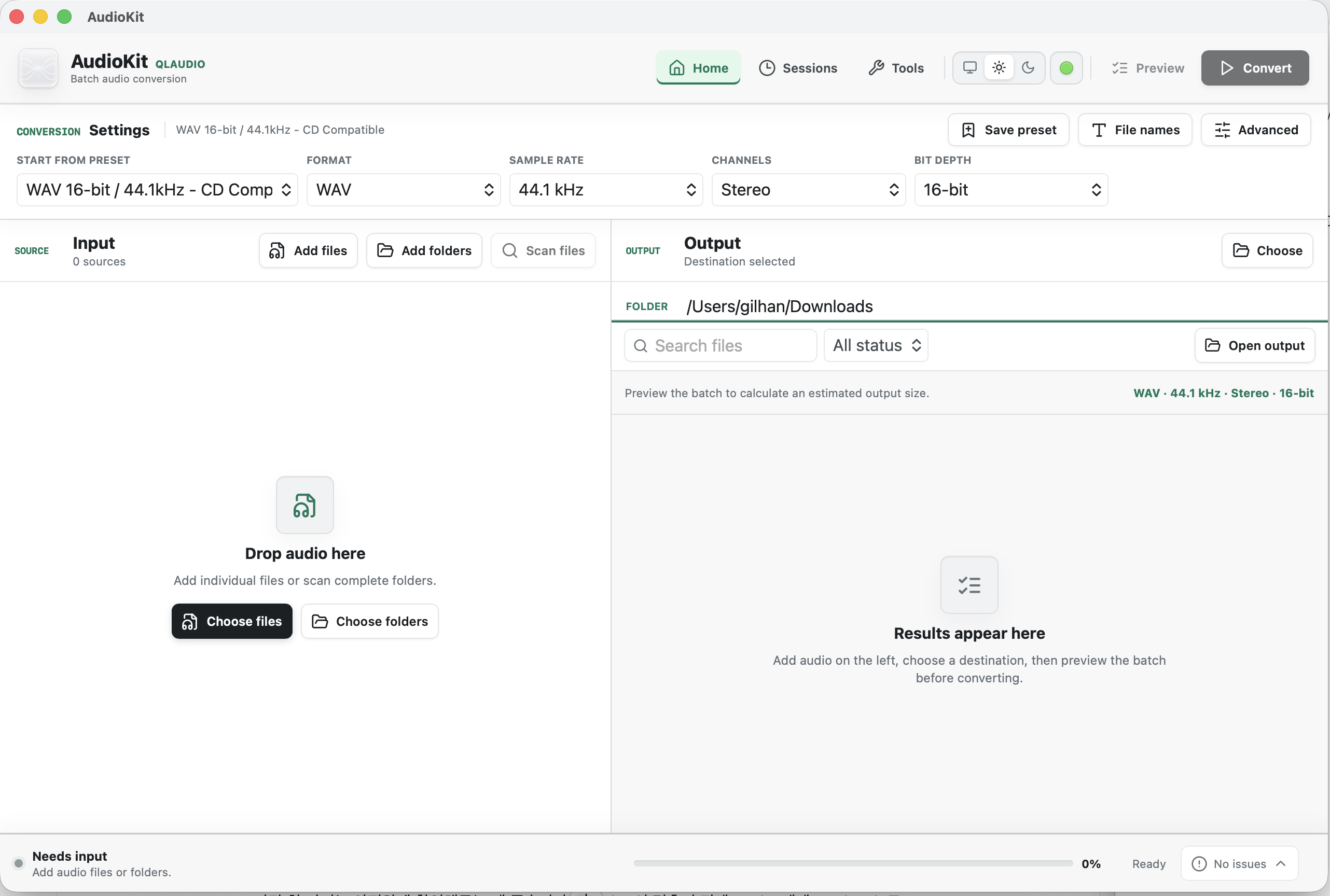
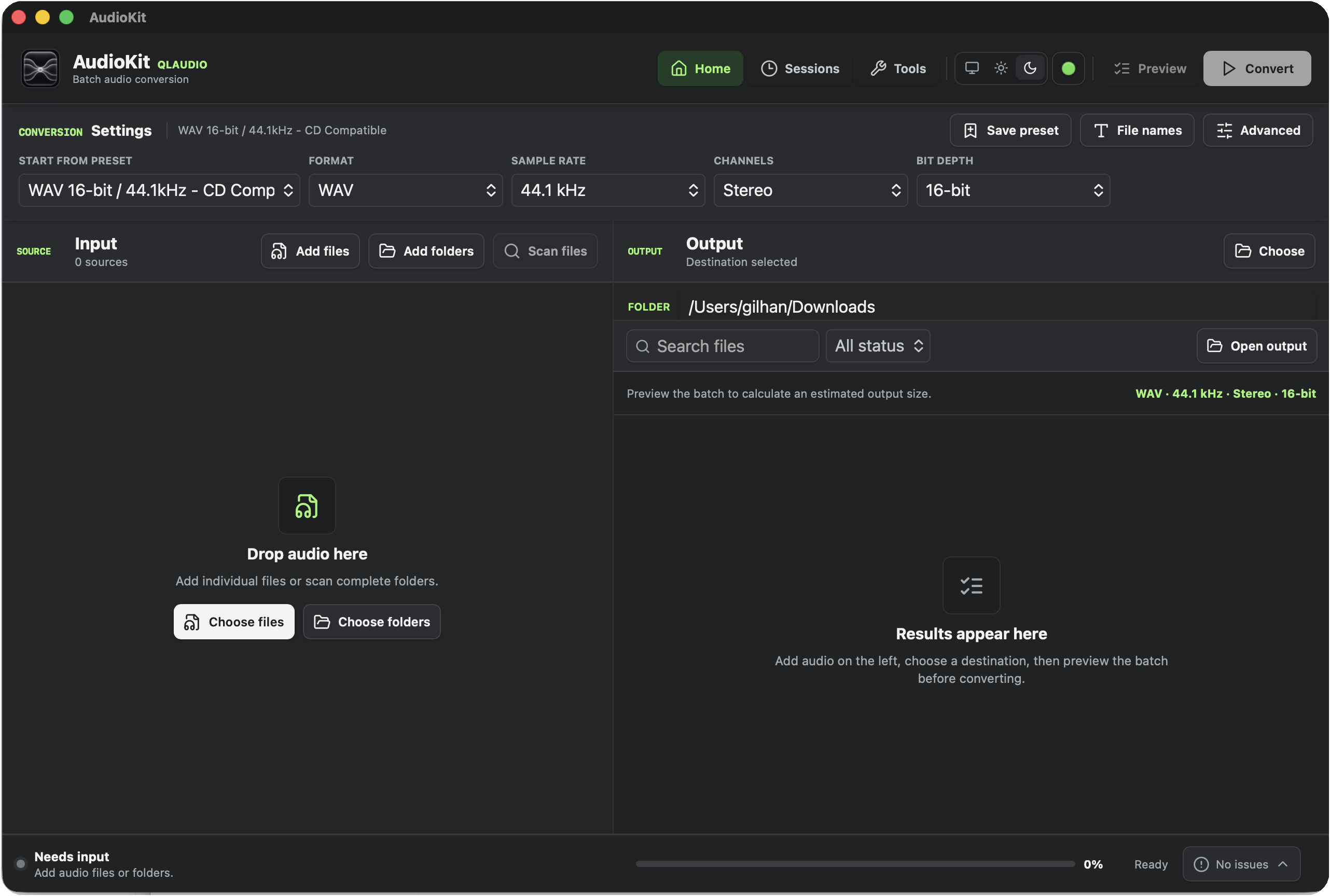
Professional Batch Audio Converter
A focused desktop workspace for converting real-world audio collections without sending your source audio to the cloud.
Build a queue from files or complete folders, define an output once, then keep every conversion visible from source to verified result.
LOCAL BATCH PIPELINE
QONVORA keeps every stage visible on your desktop. Choose a workflow to see how source files are scanned, processed, checked, and recorded without a cloud upload.
LOCAL BY DESIGN
File scanning, probing, conversion, and output verification run on the desktop. Your audio content is not sent to QLAUDIO for cloud processing.
QONVORA writes a temporary result outside the source path, validates it, and only then commits the finished output.
Saved session state makes interrupted work reviewable. Reopen a session, recover verified results, and retry failed files without rebuilding the whole queue.
REAL-WORLD BATCHES
Scan nested recording folders, preserve their structure and root names, then deliver a consistent 48 kHz WAV library without flattening the collection.
Convert masters and field recordings to FLAC or ALAC while retaining meaningful metadata, filenames, and a report of every completed output.
Generate MP3, AAC, or OGG previews in one batch with explicit bitrate or quality settings and clearly separated failures.
FORMAT CONTROL
Start from the format you need, then keep only the controls that make technical sense for it. PCM outputs use sample-rate and bit-depth choices; delivery formats present the encoding options that matter.
FORMAT-AWARE CONTROL
QONVORA filters incompatible combinations before conversion. PCM, lossless, and delivery formats each expose the controls that are technically meaningful for that output.
Keep is resolved from the first audio stream and verified in the finished output.
Keep source metadata with an explicit option to remove it from converted files.
Unsupported output combinations are rejected before a conversion job writes its final file.
Supported macOS and Windows release packages include the verified conversion tools, so normal desktop use does not require a separate command-line installation.
ADVANCED PROCESSING
Normalization stays off until selected. Peak and per-file LUFS modes analyze before conversion and record the applied result.
Choose the balance between speed and precision. Very High and Mastering prefer SoXR when the active encoder supports it.
Dither is available for valid 16-bit and 24-bit PCM or lossless targets instead of being applied blindly.
Scale a queue deliberately, choose what happens on a collision, and keep folder decisions explicit.
Combine multiple input roots, scan recursively, ignore repeated selections, and preserve Unicode filenames, spaces, and parentheses.
Preserve folder and root names, add a prefix or suffix, and optionally include the output format or selected sample rate.
Reopen a saved session, review interrupted jobs, recover outputs that already passed verification, and retry only the work that still needs attention.
Confirm the finished codec, sample rate, channels, bit depth or bitrate, duration, and before-and-after file size instead of trusting requested settings alone.
Write JSON or CSV records with source and output paths, final status, requested and used processing settings, output properties, and structured failure details.
Review byte-for-byte duplicate groups and reclaimable space without deleting, moving, or changing the source files.
QLAUDIO AUDIO SOFTWARE
QLAUDIO determines why and how personal information is used for its websites, accounts, product delivery, licensing, activation, support, and related services.
Privacy inquiries can be sent to .
This policy does not replace the separate privacy terms of an authorized payment provider or another service that independently determines how it processes information. It also does not limit privacy or consumer rights that cannot lawfully be waived.
We may process your email address, name when supplied through checkout or support, account and customer identifiers, authentication records, and the content of communications you send to us. QLAUDIO currently uses email for sign-in links, purchase and license delivery, security or service notices, and support responses. We do not currently use customer account email addresses for general promotional email campaigns.
We may receive and store an order reference, product and variant, price, currency, tax or country information made available by the payment provider, order and refund status, purchase email address, delivery status, and related timestamps. Full payment-card numbers and payment credentials are handled by the authorized checkout provider and are not intentionally stored in the QLAUDIO customer database.
To deliver and maintain purchased rights, we may process product ownership, license keys and key suffixes, license status, entitlements, redeem activity, activation limits, pseudonymous device or installation identifiers, activation and deactivation status, certificate and request status, security events, and related timestamps. A device identifier may be derived or hashed to distinguish installations without being intended to reveal the contents of your device.
When you access the website or an online service, hosting and security systems may process IP address, browser and device type, requested URL, referrer, date and time, response status, diagnostic information, and abuse-prevention logs. If you request support, we process the information and files you choose to provide. Do not send passwords, payment-card numbers, private keys, unrelated personal data, or sensitive information.
QLAUDIO desktop audio products are designed to process audio locally unless a product clearly states otherwise. Normal use of QONVORA's desktop conversion workflow does not upload source audio files to QLAUDIO. Audio may be received only if you intentionally provide it for support or through a separately disclosed online feature.
We process information only for identified and reasonably necessary purposes, including:
Depending on your location and the activity involved, our legal basis may be performance of a contract, compliance with a legal obligation, QLAUDIO's legitimate interests in security and reliable service delivery, or consent. Where processing relies on consent, you may withdraw it for future processing without affecting processing that was lawful before withdrawal.
We do not sell personal information for monetary consideration. We do not use license keys, support content, or source audio files for unrelated advertising profiles.
Purchases may be processed by Lemon Squeezy as merchant of record or by another authorized provider identified at checkout. The payment provider processes payment credentials, tax, fraud checks, refunds, chargebacks, and other checkout information under its own privacy notice. QLAUDIO receives the order and customer information reasonably required to confirm payment, deliver the product, maintain the license, provide support, and meet legal obligations.
Do not send payment-card information to QLAUDIO by email. Questions about a provider's collection of payment information should also be reviewed under the privacy notice shown during checkout.
QLAUDIO uses service providers only where reasonably necessary to operate and protect the service. These providers support:
These providers may process information in countries other than your own. Where required, QLAUDIO uses applicable contractual, security, and transfer safeguards. A checkout or other service that independently determines how it processes information may provide its own privacy notice.
We do not keep every category of information for the same period. We retain information only while it is reasonably necessary for the purpose described in this policy, to maintain a valid product right, or to meet legal, security, accounting, dispute, and fraud-prevention obligations.
When a retention period ends, information is deleted, anonymized, or isolated from ordinary use. Residual copies may remain temporarily in restricted backups until the provider's normal backup cycle expires. Information may be retained longer where required by law, a payment dispute, fraud investigation, security incident, or the establishment, exercise, or defense of legal claims.
Depending on applicable law, you may request access to personal information about you, correction of inaccurate information, deletion, restriction, objection, portability, or withdrawal of consent. Send a request from the email associated with the account to . We may request limited information to verify your identity and authority before acting on the request.
Deletion is not absolute. QLAUDIO may retain the minimum information necessary to comply with law, document a transaction or refund, preserve a valid license or product right, prevent fraud, enforce agreements, or resolve a claim. Information retained for a legal exception will be restricted from unrelated use.
Deleting account-identifying information may prevent email code sign-in, My Account access, downloads, activation management, or ownership recovery. Before completing a deletion that would affect an active or perpetual license, we will explain the practical effect and, where reasonably available, discuss an alternative such as changing the account email or retaining a minimal ownership record.
You may also complain to the privacy or data-protection authority responsible for your location.
QLAUDIO products and services are intended for music creators and general audiences and are not directed to children under 14, or a higher minimum age where required by applicable law. We do not knowingly request personal information from a child who cannot lawfully provide it without a parent or legal guardian.
If we learn that a child's information was collected in circumstances requiring parental or guardian authorization, we will take reasonable steps to delete it or obtain the required authorization. A parent or guardian may contact . Minors should obtain any consent required by local law before making a purchase.
QLAUDIO uses reasonable administrative and technical measures intended to limit access, protect credentials, verify requests, separate public and privileged operations, and reduce unnecessary collection. Service providers are selected in part for their security and data-protection controls. No internet service or storage system can guarantee absolute security.
Never send QLAUDIO your account password, full payment-card number, private signing key, activation secret, or unrelated sensitive information. If you believe your account, email, license, or personal information has been compromised, contact us promptly.
We may update this policy when products, providers, legal requirements, or processing practices change. The latest version will remain available on this page with its update date. If a change materially affects how existing customer information is used, we will provide additional notice where reasonably possible or legally required.
These Terms of Use govern access to the QLAUDIO website, accounts, support services, and Digital Products made available by QLAUDIO or through an authorized checkout. By using the website, creating an account, downloading a product, redeeming a code, or completing a purchase, you agree to these Terms.
Digital Products include software, audio plug-ins, virtual instruments, sound libraries, sample packs, standalone desktop applications, updates, documentation, and related electronically delivered content.
If you do not agree with these Terms, do not purchase, download, install, activate, or use a Digital Product. Nothing in these Terms limits a consumer right that cannot lawfully be excluded, waived, or restricted.
Before purchase, review the applicable product page, including supported operating systems, processors, plug-in formats, DAWs or hosts, required third-party software, included content, features, limitations, and system requirements.
Product demonstrations, screenshots, audio examples, documentation, trial builds, and free versions are provided to help evaluate suitability where available. Contact QLAUDIO before purchase if you need help determining whether a product is appropriate for your system or workflow.
QLAUDIO may improve or update products over time. An update will not intentionally remove a perpetual right already granted for the purchased major version, but future major versions, services, or content may be offered separately.
Prices, currencies, taxes, discounts, and the payment provider applicable to an order are shown at checkout. Purchases may be processed by Lemon Squeezy as merchant of record or by another authorized provider identified during checkout.
The payment provider may apply its own checkout, tax, fraud-prevention, refund, chargeback, and payment-processing terms. Those provider terms apply to payment processing in addition to these Terms, subject to applicable law.
An order is complete only after payment is successfully authorized and the order is accepted. QLAUDIO may cancel or review an order affected by fraud, payment error, pricing error, sanctions restrictions, or unauthorized activity.
Digital supply may begin when a download is made available, a license key is issued, account access is granted, a redeem code is accepted, or license activation is completed. Keep the purchase email address accessible because account and delivery access may depend on it.
Unless a product page or separate license states otherwise, a purchase grants the purchaser a limited, non-exclusive, non-transferable right to install and use the Digital Product for personal or professional creative work. The Digital Product itself is licensed, not sold.
You must not share, sell, sublicense, distribute, publish, upload, copy for another person, circumvent license controls, reverse engineer except where law expressly permits, or install a personal license in a public environment available to unspecified users.
You are responsible for maintaining the security of your account, email access, license keys, redeem codes, and activated devices. Contact QLAUDIO promptly if you believe access has been compromised.
REFUNDS AND DIGITAL PRODUCTS
Digital Products are supplied electronically. Where applicable law allows, cancellation or withdrawal rights may be limited after digital supply has begun. QLAUDIO does not use this policy to exclude any statutory right that cannot lawfully be waived or restricted.
To the extent permitted by applicable law, a discretionary refund will not normally be provided after digital supply has begun for:
QLAUDIO will investigate a duplicate payment or payment-processing error, failure to provide the purchased product or access, a material difference from the contractual product description, a confirmed material defect that prevents normal use and cannot reasonably be resolved, and any case where a remedy is required by applicable law or a binding payment-provider policy.
For a technical issue, QLAUDIO may request the product version, operating system, DAW or host version, error message, crash report, and reproducible steps. Where lawful and reasonable, QLAUDIO may first offer troubleshooting, a fix, or a replacement build. This process does not limit or unreasonably delay a mandatory consumer remedy.
Email with the order number or receipt, purchase email address, product name, a concise description of the issue, and any information reasonably needed to investigate it. Do not send payment-card numbers, passwords, private keys, or unrelated sensitive information.
If a refund is approved, associated order rights, downloads, licenses, activations, account entitlements, and other product access may be cancelled or deactivated. A refunded Digital Product must not continue to be used, copied, distributed, or activated.
Refund timing and the amount returned may depend on the original payment method, payment provider, taxes, fees, and applicable law. Lemon Squeezy or another authorized payment provider may also process refunds or chargebacks under its own policies.
A product sold and priced as one bundle is one purchase item. QLAUDIO does not normally provide a discretionary partial refund for selected components after supply has begun, without affecting any non-excludable right that applies to the bundle or an undelivered portion.
Customers should contact QLAUDIO first when possible so the issue can be reviewed. Customers remain free to use an available payment-provider or card-issuer dispute process.
QLAUDIO aims to provide reasonable installation, account, delivery, and technical support for supported product versions. Support does not include configuring unrelated third-party systems or guaranteeing compatibility not stated on the product page.
Website, account, download, or activation services may occasionally be interrupted for maintenance, security, provider outages, or circumstances outside reasonable control. QLAUDIO will take reasonable steps to restore affected services.
QLAUDIO and its licensors retain all intellectual-property rights in the website, software, interfaces, recordings, samples, documentation, branding, and other protected materials. No ownership transfers except for rights expressly granted in a product license.
You must not interfere with the website or services, probe security controls, automate abusive requests, distribute malicious code, impersonate another person, use stolen payment information, or use QLAUDIO services in violation of law.
To the maximum extent permitted by applicable law, QLAUDIO products and services are provided on an "as available" basis and without warranties beyond those expressly stated or legally required. QLAUDIO does not guarantee that every product will meet every creative preference or operate with unstated hardware or third-party software.
To the maximum extent permitted by applicable law, QLAUDIO will not be liable for indirect, incidental, special, or consequential loss, loss of profits, or loss of data arising from use of a product or service. Nothing in these Terms excludes liability or remedies that cannot lawfully be excluded or limited.
Maintain independent backups of projects, source recordings, presets, account information, and other important data before installing or using software.
QLAUDIO may suspend or terminate access where reasonably necessary to address fraud, unauthorized sharing, payment reversal, security risk, material breach of these Terms, or legal requirements. Where appropriate, QLAUDIO will provide notice and an opportunity to resolve the issue.
These Terms may be updated for future use and purchases. The version presented at the time of purchase applies to that order unless mandatory law requires a different result. Material changes will be identified by a revised update date.
Questions about these Terms, an order, delivery, licensing, or a refund review can be sent to .


